The Size Filtering Task This thom browne Knitwear Organization Aims to Solve
If you're looking for thom browne Fall/Winter knitwear on fashionreps, the real problem to solve is usually not "which one looks best," but first getting sizes, colors, product links, and QC clues organized into a state you can review. This guide is for buyers who need to compare multiple knit styles, record filtering reasons, and continue adding information later.
After reading, you should be able to do three things: locate candidate items in fashionreps' website-based Spreadsheet or product catalog; organize key fields into Google Sheets; and mark sizes, images, links, and QC information that need to be re-confirmed before making a purchase decision. If you just want to buy one item in a size you already know, this organization process may seem overly detailed. 🧶
Page information and prices are time-sensitive. This article is based on information visible on October 15, 2026. USD reference prices, product quantities, sizes, link status, and QC entry points should all be re-verified in actual operation.

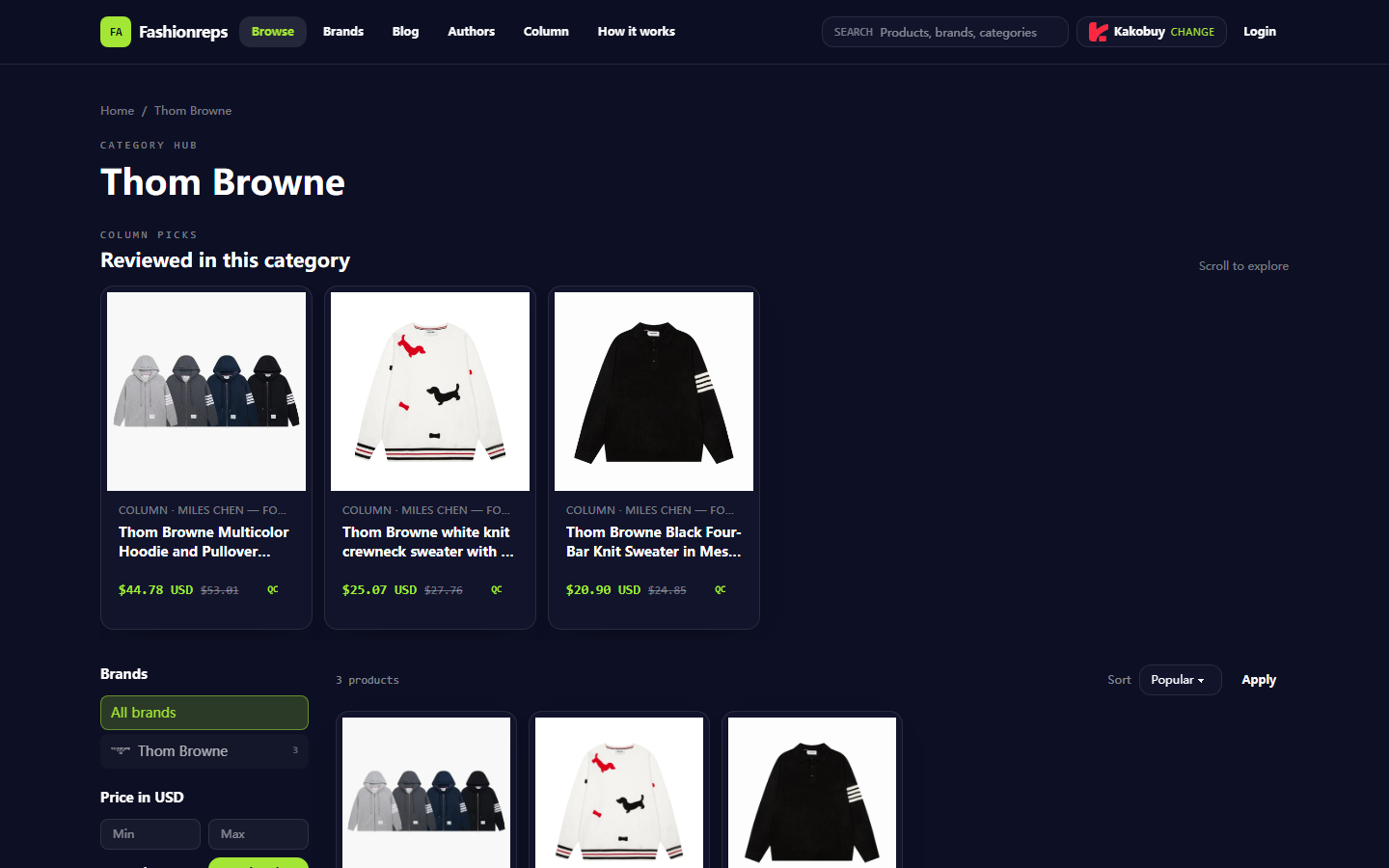
Image: fashionreps' Thom Browne category page allows viewing items by brand and price, showing sizes, reference prices, and QC entry points.
How to Check Real-Time Product Fields in fashionreps' Website-Based Spreadsheet
fashionreps' product catalog is more like a visual Spreadsheet for browsing: you start from a brand category or product card, then use on-page filters and sorting to narrow down. The visible Thom Browne category has 3 products, showing brand filter, USD price range, and options to sort by popular, newest, price low to high, or high to low.
Candidate information visible in the current page summary is as follows. These prices are page-listed reference prices and do not represent fixed transaction prices, nor do they include shipping, taxes, or final cart amounts.
| Visible Candidate | Page Shown Sizes or Description | Reference Price | Clues for Further Verification |
|---|---|---|---|
| Multicolor Hoodie and Pullover Collection in Yarn-Dyed Cotton | S–XXL | $44.78 USD | Page shows QC entry and previous reference price $53.01 |
| white knit crewneck sweater with a color-block dachshund motif | Page summary does not list full sizes | $25.07 USD | Need to enter product page to confirm sizes and QC info |
| Black Four-Bar Knit Sweater in Mesh Knit | M–2XL | $20.90 USD | Page shows QC entry and previous reference price $24.85 |
When operating, don't just record the product name. First observe whether the product card simultaneously provides size range, color or pattern description, reference price, and QC mark; if any of these are missing, list it as "to be verified" rather than filling it in yourself. Especially when "page summary does not list full sizes," you cannot infer sizes based on similar styles.
The advantage of a page-based catalog is discovering candidate products: images, titles, and category context are gathered together, making it easier to first see style differences and then decide which items are worth putting into an organization sheet. Its limitation is also obvious: when the number of candidates increases, comparing measurement information across products, recording personal notes, and tracking review times becomes inconvenient.
How to Set Up Size, Color, Link, and QC Note Columns in Google Sheets
Google Sheets is better suited as your review workbench. It's recommended to first create a row of fields, then fill in information that can be confirmed on the page item by item, and not to fill in content without evidence just to make the table complete.
Recommended fields include:
- Product name
- Product category
- Color or pattern description
- Page displayed sizes
- Personal size points to check
- Page reference price
- Price verification date
- Product page status
- Product image clarity
- QC mark visibility
- QC entry opened
- QC questions to confirm
- Purchase link
- Reason for holding or continuing comparison
"Page displayed sizes" and "personal size points to check" should be separate. The former only records what the page explicitly states, such as S–XXL or M–2XL; the latter can say "need to confirm chest measurement method," "need to compare with existing clothing size," but cannot write personal speculation as the product's actual size.
If you use Google Sheets' filter function, you can first filter by "page status" for still-accessible products, then by "size info" for candidates with clearly listed sizes. Then separately filter "QC entry opened" to avoid mistaking products that only have a QC label but whose specific content hasn't been viewed as having completed QC verification.
When sharing the sheet, it's recommended to keep "last verification time" and "verifier/verification source" columns. In multi-person collaboration, anyone modifying size, price, or link status should note the basis for modification in remarks. This can distinguish between page changes, manual entry errors, and personal purchase preferences. 📋
Specific Operation Comparison Between Website Category Browsing and Sheet Filtering
The two tools solve problems at different stages. fashionreps helps you discover and open candidate products; Google Sheets turns candidates into comparable, reviewable records.
On the website, it's recommended to operate in the following order:
- Enter the Thom Browne category page, confirm page title, category range, and product quantity.
- First browse product images and names, exclude candidates that clearly do not meet color, pattern, or style needs.
- Use brand or price filters to narrow the page range; do not treat sorting results as quality rankings.
- Open candidate product pages, check complete product name, size information, page images, and QC entry.
- Copy confirmed fields to Google Sheets and fill in verification date.
- For unconfirmed items, use "pending verification" or "cannot confirm" rather than leaving blank and forgetting to handle.
In Google Sheets, it's recommended to review in another order: first filter rows where links are still accessible, then filter rows with complete size information, and finally check QC notes. This avoids skipping size verification due to low price or attractive images.
Price filtering also requires restraint. A low price only shows that the page reference price is low; it cannot directly indicate better material, workmanship, size accuracy, or QC results. The page's displayed previous reference price can help you record price changes but cannot replace price confirmation on the final checkout page.
How to Review Product Images, Size Information, and QC Entries Item by Item
Images are first used to confirm whether the style you're viewing matches the title, such as color, pattern placement, and overall silhouette. Images cannot prove that you've touched the material, nor can they alone prove product size or workmanship status.
Size verification has at least three layers:
- Whether the page explicitly lists available sizes.
- Whether the page provides specific measurement information or a size chart.
- Whether the measurement method is consistent with your existing clothing or personal records.
If the page only shows a range like S–XXL or M–2XL without key measurements, you should record "size range known" and "fits personal body" separately. Don't interpret a wider range as easier to fit, and don't automatically select a size based on brand name or similar products.
QC entry also needs step-by-step confirmation. A QC mark on the page only indicates that the page provides an entry for further checking; you still need to confirm whether the entry can be opened, whether there are images or descriptions corresponding to the product, and whether it contains information that can answer your questions. If the entry fails, is empty, or doesn't match the product, keep an anomaly record in the sheet.
You can write QC notes as specific questions, such as "Can the knit texture be seen clearly?" "Is the color consistent with the product image?" "Are there detail images for comparison?" Don't write conclusions like "quality is good" that cannot be reviewed from records. 🔍
Applicable Boundaries of Both Tools in Mobile Browsing and Long-Term Organization
Mobile browsing is suitable for quickly discovering products and opening single pages. Product cards, images, and category navigation are concentrated for easy recording of candidate names in spare moments. But the small screen makes copying multiple fields, comparing sizes horizontally, and checking long links more error-prone.
Google Sheets is suitable for maintaining long-term lists on mobile or desktop. It allows filtering rows by status, size, color, price verification date, or QC notes, and is also suitable for sharing with others who need to review together. However, the sheet does not automatically prove that links are still valid, nor does it automatically determine whether a size fits you.
A practical approach: use fashionreps for discovery and page verification, and Google Sheets for structured records. Don't treat Google Sheets as a product source, and don't treat website product cards as complete order records. Only transfer confirmed fields between the two.
Verification Limits of Page Timeliness, Link Status, and QC Evidence
Product pages may undergo price changes, delisting, redirection, or content updates. "Verified" in the sheet can only represent the page status at a certain point in time, so verification date should be saved. If after reopening, the product name, price, size, or image changes, update the original record instead of adding a new row to cause duplication.
Payment, inventory, shipping, destination taxes, import restrictions, return/exchange conditions, and final QC content during the purchase process cannot be judged solely from the category page. When entering an actual shopping agent or seller page, you should separately check the current terms on the corresponding page. This article does not provide methods for under-declaring, splitting orders to avoid taxes, or circumventing inspections.
If a product link cannot be opened, check in order whether redirection occurs, whether the page returns empty content, whether the product still belongs to the original category, and whether the page still shows a clear product name. If only tabs or category entries are visible, do not record it as a verified valid product page.
Post-Organization Actions: Review, Follow-Up Inquiry, or Hold Purchase
After organization, first filter candidates with "size confirmed, link accessible, QC entry reviewable," then compare colors, patterns, and prices. For products still lacking key measurement data or QC evidence, keep them in pending inquiry status and do not fill gaps with guesses.
If you decide to continue with a purchase, at least save the product name, current page reference price, size basis, page link, verification date, and questions to confirm with the seller or agent. Re-confirm inventory, checkout price, shipping, taxes, customs responsibility, and return/exchange conditions before final order.
The main benefit of merging organization into Google Sheets is reducing repeated page openings, missed size fields, and forgotten reviews; the cost is the time needed for entry and maintenance, as well as risks of outdated sheets, broken links, or multi-person editing conflicts. It suits those who need to compare multiple candidates, track links long-term, and retain QC clues. It's not recommended to build a complex sheet just to buy one item with confirmed size and link, nor to treat old prices or old QC notes in the sheet as a current purchase guarantee.